Employee onboarding checklist, ready to import
The five onboarding stages, from before day one to day 90, with deadlines that calculate themselves and a template ready to import.

An employee onboarding checklist lays out everything that has to happen for a new hire to arrive, settle in and become part of the team, from the job offer to day 90. In Experto, each stage becomes an account list connected to the next one, and each new hire moves through the stages with a due date.
Here's the full checklist, stage by stage, plus a template ready to import.
Why onboarding falls through the cracks
Onboarding falls through the cracks because it passes through many hands and nobody sees the whole picture. HR handles the contract, IT the logins, the manager the plan. Day one arrives, and the laptop doesn't.
It's a common problem. In Gallup's research, only 12% of employees strongly agree that their organization does a great job onboarding new employees.
The employee onboarding checklist, stage by stage
There are five stages, each with who runs it and what has to be done by the end.
Before day one (HR)
- send the contract and the list of documents;
- create the email account and system access;
- get the desk, equipment and badge ready;
- pick a buddy;
- put together the first-day agenda;
- let the team know someone is joining.
First day (manager and HR)
- welcome them on time and introduce the team;
- hand over the equipment and check the logins;
- talk about what's expected in the first month;
- have lunch with the buddy or the team.
First week (manager and buddy)
- role and tool training;
- shadow someone on the team;
- a small first deliverable, with help;
- an end-of-week chat with the manager.
First month (manager)
- 90-day goals agreed and written down;
- a weekly check-in with the manager;
- the role's recurring tasks already in the person's lists;
- a 30-day review.
Up to day 90 (manager and HR)
- two-way feedback halfway through;
- final review and decision;
- ask the person what was missing from onboarding.
Many companies tie this stage to the probation period. In Brazil, for example, a probationary contract can't exceed 90 days (CLT, art. 445), so the decision has to come before that.
How the template works in Experto
Each new hire is an item, and each stage is an account list connected to the next. The title follows the Name · Role pattern, the Key date holds the first day and the description carries the plan for every stage.
Stage done? The item moves to the next list, already with a due date:
| Stage | Due date on arrival | Who runs it |
|---|---|---|
| Before day one | you set it: the first day, 9:00 AM | HR |
| First day | 1 working day | manager and HR |
| First week | 4 working days | manager and buddy |
| First month | 3 weeks | manager |
| 90 days | 2 months | manager and HR |
| Onboarded | 2 working days | HR |
The rule that makes the deadlines line up: complete Before day one when the person arrives. From then on, the first week is due at the end of the week, the first month around week four and the 90 days around the third month.
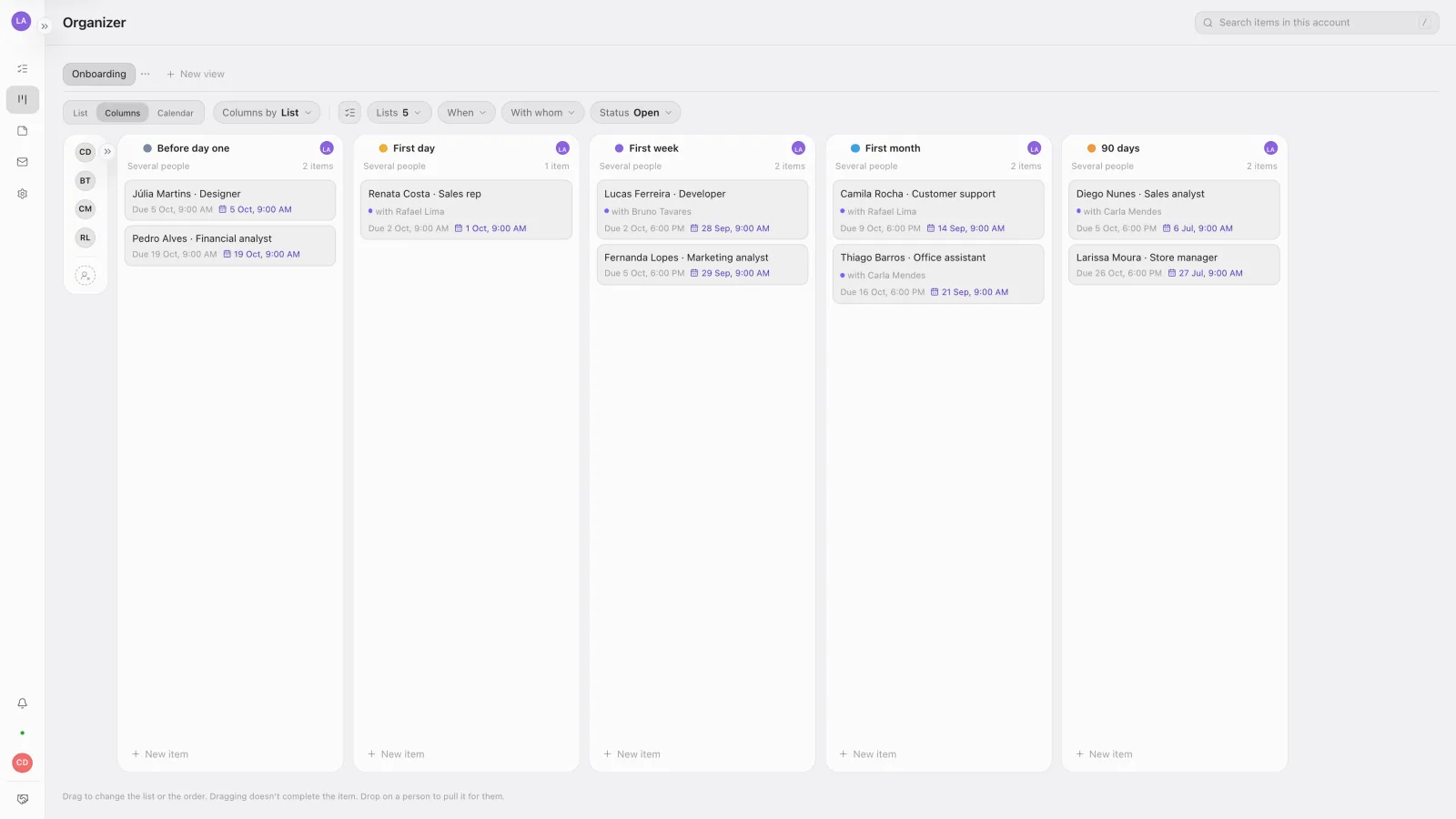
In the Organizer, on the web, the stages sit side by side, and you can see at a glance who is in each stage and who has it.
Who runs each stage, without assigning anyone
Whoever runs the stage gives the item a Pull, and the whole team sees who has it. The item lands in that person's checklist for the day without leaving the stage list. It's Experto's way to split tasks without assigning them.
Done? The item moves to the next stage, the Pull ends and whoever handles the next stage pulls it there.
The lists arrive as Admins only. Under Who’s in, open the stages to HR, managers and buddies with Specific people, and keep Onboarded with admins only. The new hire stays out of these lists, because they hold their reviews.
Tell the team, with read receipts
Send a message to the team and see who has read it. In Administration › Messages, write something like "Ana Souza joins us on Monday as a sales analyst. Bruno is her buddy." Under Recipients, choose All active or Choose people.
Turn on Important so the notice stays on screen until it's read. Once it's sent, the message shows how many people read it, and the Only unread filter tells you who's missing.
On day one, invite the new hire to the account. Getting started with Experto walks through it, from the invite to the team's lists.
Download the template and import it in 3 steps
The template turns this employee onboarding checklist into seven account lists: Start here, the five stages and Onboarded. Start here holds the steps to set up and test, plus the template item to duplicate for each new hire.
Download the onboarding template (.json)
- Sign in to your account as an admin.
- Click the gear next to My lists and choose Import lists.
- Check the 7 lists and 9 items in the preview and click Import.
For each new hire, select the template item with ⌘ + click (Ctrl + click on Windows) and use Duplicate in… › Before day one. On the copy, change the title and set the first day as the Key date, which you turn on in Administration › Account › Use key date.
Other beginnings, same flow
The same design works for other arrivals.
- Chains with several stores: each unit's new manager goes through the same stages, and the franchise management template shows how headquarters follows each store.
- Clients instead of employees: the client implementation template takes a new client from kickoff to go-live.
- After day 90: whatever repeats, like the monthly chat with the manager, becomes a routine in a list connected to itself.
Frequently asked questions
How long should onboarding last?
The template runs to day 90, which is also the probation limit in Brazil. If the role needs less time to ramp up, shorten the deadlines in Connected list › Estimate.
Who is responsible for onboarding?
HR coordinates, and each stage has someone running it: the manager, the buddy, IT. Experto has no assignee field. Whoever runs the stage gives it a Pull, and the list shows who has it.
Can I track several new hires at once?
Yes. Each person is an item, so each list shows who's in that stage, and the Organizer shows every stage side by side.
Ready to welcome your next hire without the rush? Create your free account, import the template and put your employee onboarding checklist to work.