Go-to-market checklist for micro SaaS, ready to import
22 actions in 5 phases, each with the why, the step by step and the sign it's done. Download the template and import it into Experto.

Go to market is the plan for how your product reaches the people who will pay for it: who to sell to, with what message, at what price and through which channels. This go-to-market checklist for micro SaaS brings together 22 actions in 5 phases, and each one comes with the why, the step by step and the sign that it's done.
Download the template, import it into Experto and work phase by phase, on your own or with your cofounder.
What go to market is and why a micro SaaS needs one
Go to market, or GTM, is the bridge between a finished product and the first paying customer. It answers, in order, who the product is for, what people find when they arrive, where they come from and what happens after they pay.
A good product with no path to the customer doesn't last. In The top 9 reasons startups fail, CB Insights looked at 431 venture-backed startups that shut down since 2023, and 43% of those with an identified reason had poor product-market fit.
In a micro SaaS, with no sales team and no ad budget, every hour of distribution has to count. The checklist helps you spend those hours in the right order.
The 5 phases of the go-to-market checklist
The checklist follows the order in which the questions come up: first who it's for, then what the customer finds, where they come from, launch day and what keeps running.
| Phase | The question it answers | Actions |
|---|---|---|
| Positioning | Who is it for, and why would anyone switch from their current way? | 4 |
| Product | Do people who sign up see the value and pay without friction? | 5 |
| Acquisition | Where do the first customers come from? | 7 |
| Launch | How do you create a spike of attention? | 2 |
| Post-launch | What needs to run every week? | 4 |
Every item in the template starts with the phase name, like Positioning · Pick a narrow audience. That keeps the list in order, and anyone can see which phase the plan is in.
Phase 1: Positioning
Before any channel, decide who the product is for and why that person would switch from the way they work today.
- Pick a narrow audience: 2 profiles at most for the next 90 days, described in the customer's own words.
- Sum up the product in one sentence: "[Product] helps [audience] [get a result] without [pain]". It's done when 7 out of 10 people from your audience can explain the product after reading only the sentence.
- Map the customer's real alternative: it's usually the spreadsheet, the group chat or email. Each of its failures becomes a sales message.
- Set the price and when to charge: 2 or 3 plans, with billing kicking in after the customer has already seen value.
Conversations with your audience produce a lot of action items. If you record your calls, you can turn meeting notes into tasks with AI and not lose a single one.
Phase 2: Product
The product has to hold on to the people who arrive: show value fast, charge without friction and answer questions.
- Define your activation metric: the action that separates those who stay from those who leave, with a deadline, like "created their first project and invited 1 colleague within 3 days".
- Measure the full funnel: visit → signup → activation → paying → renewal, with the source of every signup.
- Set up your email sequences: welcome emails on days 0, 1, 3 and 7 that stop once the person activates.
- Automate billing and failed payments: a declined card goes through retry, notice and pause with no one lifting a finger.
- Set up a fast support channel and a help center: a question that shows up 3 times becomes a short article or a fix on screen.
Phase 3: Acquisition
It's the longest phase in the checklist, with 7 actions, and it starts with the hardest one: selling in conversations.
- Sell to your first customers in person: 50 people from your audience, a 20-minute conversation each, never opening with a pitch.
- Create SEO pages with buying intent: comparisons, "alternative to" pages and ready-made templates to download.
- Get listed in directories and app stores: qualified visits, links and your first reviews.
- Join your audience's communities: for the first few weeks, just help.
- Build partnerships and an affiliate program: start with 3 close partners before opening a program.
- Use growth inside the product: one-click invites, shared links and referrals with a clear reward.
- Use paid ads only after you know CAC and LTV: one test at a time, measuring all the way to payment.
Got your list of 50 names in a spreadsheet? You can paste multiple tasks at once and get one task per person, with the company in the description.
Order matters. Paid ads come last on purpose: ads amplify what already works, and a leaky funnel stays leaky with a bigger budget.
Phase 4: Launch
Launch concentrates on a single day all the attention you built in the earlier phases.
- Gather social proof before launch: 5 approved testimonials and 2 short case studies with a number, near the signup and pricing buttons.
- Plan launch day: a date picked 3 to 4 weeks ahead, a page on a launch directory, a LinkedIn post, an email to your list and a founder offer valid only that week.
On the day, be available to answer everything in the first hours. Afterwards, publish your numbers and what you learned: that brings attention too.
Phase 5: Post-launch
After launch, go to market becomes a routine.
- Talk to the people who pay and the people who cancel: your first 10 paying customers within 30 days, and a "what made you cancel?" for every cancellation.
- Review the numbers every week: a fixed 30 minutes to read MRR, cancellations, activation and signups by channel, and pick one action.
- Publish a changelog: a "What's new" page written from the customer's point of view.
- Set aside fixed time for distribution: half the week for the product, half for sales, content and partnerships.
Three of these actions repeat every week. They work better as recurring tasks: a list connected to itself, where the item comes back with a new due date every time you complete it.
How each action is explained in the template
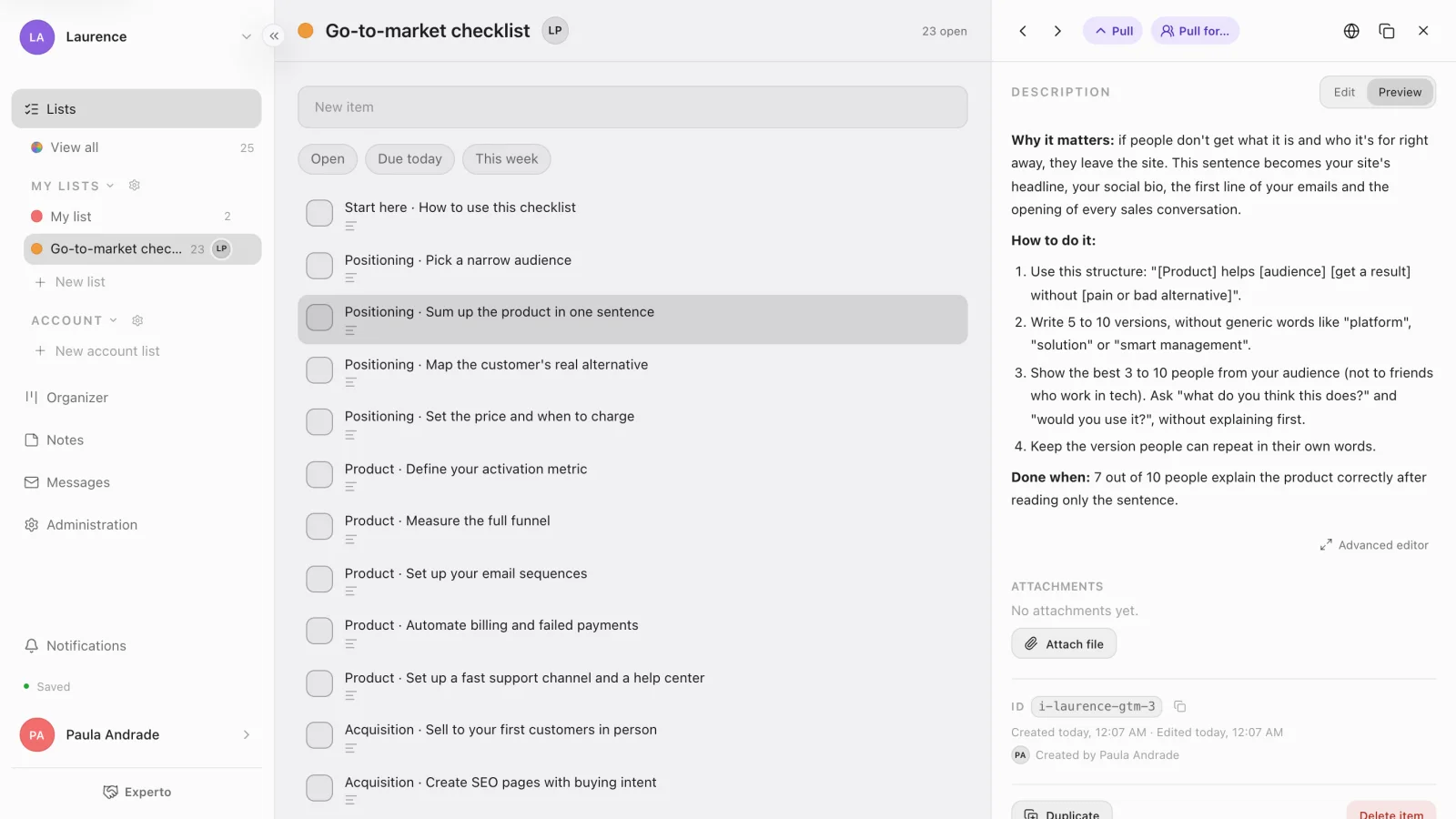
Every item in the template has three blocks: Why it matters, How to do it and Done when. The last one is the objective sign that the action is finished, so nobody checks it off just because they started.
Here's an example, the way it shows up in the item:
Positioning · Sum up the product in one sentence
Why it matters: if people don't get what it is and who it's for right away, they leave the site.
How to do it: four steps, from the structure of the sentence to testing it with 10 people from your audience.
Done when: 7 out of 10 people explain the product correctly after reading only the sentence.
Each action also comes with an effort estimate, like 3 business days or 2 weeks. It's a starting point: adjust it to your pace. The template has no fixed dates, so you add due dates when you start each phase.
Download the template and import it in 3 steps
The template is an Experto file with 1 list and 23 items: the 22 actions plus a Start here item that explains how to use the checklist.
Download the go-to-market checklist (.json)
- Sign in to your Experto account.
- Click the gear next to My lists and choose Import lists.
- Choose the file, check Lists: 1 · Items: 23 (0 completed) in the preview and click Import.
Why the template is a personal list
The checklist arrives as a personal list, under My lists, because a micro SaaS go to market usually starts with one or two people. In practice:
- anyone can import it, no admin role needed;
- the list arrives private, set to Only me, and you decide who to share it with;
- to work with your cofounder, open the list settings and, under Sharing, choose Specific people and Everyone can edit;
- has the team grown? If you're an admin, use Turn into an account list in the list settings and decide who takes part.
With the list shared, each person gives a Pull to the item they're working on, and the list shows who has it. Nobody has to hand anything out: that's how you split tasks without assigning an owner.
To fit the actions into your calendar, open the Organizer on the web and plan your team's week with the checklist next to your other lists.
Frequently asked questions
What's the difference between go to market and a marketing plan?
A marketing plan covers communication. Go to market is broader: it includes audience, price, product, sales channels and the launch of a new product or the entry into a new market.
Do I need to do all 22 actions before launching?
No. Positioning and Product come first, a good part of Acquisition runs alongside the launch and Post-launch keeps going afterwards. Start with the phase you're in today.
Can I use the checklist without Experto?
All 22 actions are summarized in this post. The file has the full step by step for each one, ready to import into Experto, with estimates, due dates and Pull.
How much does Experto cost for me and my cofounder?
Experto is free forever for up to 2 members, with every feature. Pricing for larger teams is on the pricing page.
Ready to take your go to market off paper? Create your free account, import the checklist and complete the first Positioning action this week.