Template for builders and architects: sites, inspections and the owner's sign-off
A ready-to-import Experto template: each job goes from design to handover, with inspections, photos and the owner approving in one click.

Construction project management means getting the office, the site and the owner to see the same version of everything: the approved design, each job's deadline and what has already been signed off. This template sets that up in Experto, with each site kept apart, connected stages and the owner approving in one click, with drawings and photos attached.
Download the file, import it into your account and take the sample work item from design to handover before bringing in your real sites.
Where construction project management breaks down
Construction project management breaks down in the gaps: between the office and the site, and between the team and the owner. Almost every builder knows these scenes:
- the crew built from the old drawings because the revision stayed in someone's inbox;
- the owner approved the tiles in a voice message, and nobody can find the approval;
- the handover inspection stayed on paper, and the punch list never closes;
- with several sites at once, the office doesn't know what's stuck where.
The cost shows up at the end, in rework and in arguments over what was agreed. That's why every approval needs three things on record: who approved it, when and against which specification.
Why the owner's sign-off needs a date
Brazil's Civil Code itself deals with accepting construction work in stages. In the Brazilian Civil Code (Law 10,406/2002), article 614 says that work that has been measured is presumed verified if the owner doesn't report flaws or defects within thirty days of the measurement.
Article 615 says that once the work is finished as agreed, the owner must accept it, and that they can reject it if the builder strayed from the instructions, the plans or the technical rules. In practice, having each stage's sign-off on record heads off arguments at the end of the project.
The contract and the handover document are still the formal records. What the template handles is the day to day: each sign-off stays on the work item, with the date, the spec and the photos.
How the template organizes a construction firm
The template separates the site, the work item and the stage, and each one has its own place in Experto. The structure:
- Account: your construction company, architecture firm or renovation business, with the whole team.
- Sites: each site becomes a sub-account, with a name, color and photo. The owner joins as a guest, without taking a seat.
- Work items: each job in each room is an item, like
Kitchen - Cabinetry, tagged with the site. - Stages: each stage is an account list, connected to the next one, with a deadline on every handoff.
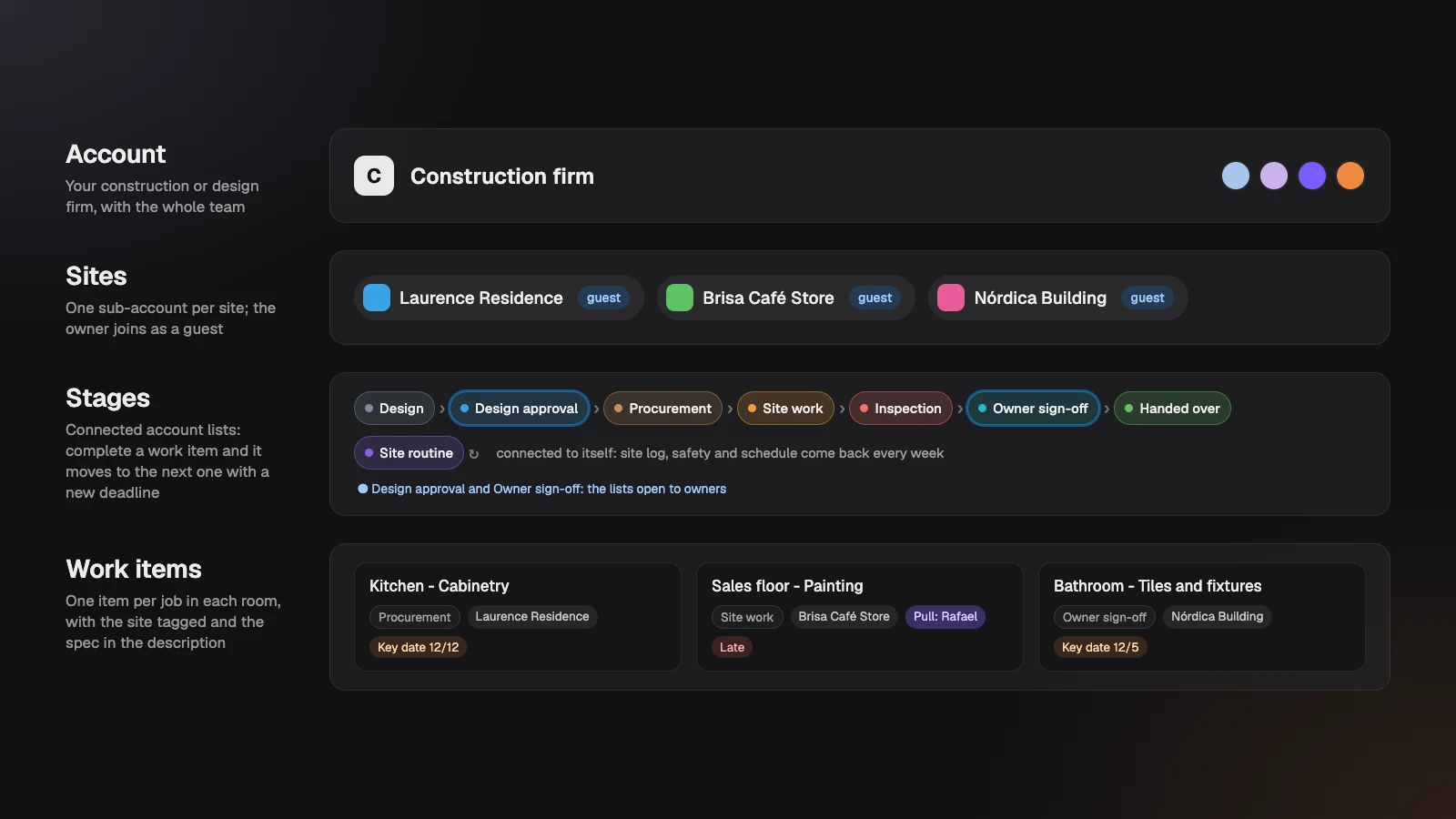
If you've read the client implementation template, you'll recognize the idea: whoever is outside the team completes only what's theirs. Here, that's the site owner, and what they approve arrives with drawings and photos attached. It's what the Experto for construction and architecture page promises, now as a ready-made template.
Each work item's path, from design to handover
Each work item goes through seven lists, and every handoff gives it a new deadline. Deadlines count in business days, based on the account's working hours (include Saturday if your crews work it).
- Design. The architect details the job: specification, quantities and the drawings as a PDF. Whoever creates it sets the deadline.
- Design approval (3 business days). The owner sees the spec and approves by completing the item.
- Procurement (10 business days). Quotes, order and material on site. Jobs with their own timeline, like cabinetry, get their deadline edited by hand.
- Site work (10 business days). The foreman Pulls the work item, which lands in their daily checklist and shows everyone who has it.
- Inspection (2 business days). The person in charge checks it against the drawings and attaches photos. Found a defect? Move to… sends it back to Site work.
- Owner sign-off (3 business days). The owner sees the photos and approves the finished job.
- Handed over (2 business days). The job goes into the progress billing and closes.
Added up, a work item takes about 30 business days from the end of design to handover. No one has to drag anything or ping the next person: completing it moves it along.
Construction checklist: the spec for each job
Each item's description is the job spec, and the owner reads it at approval and at sign-off. So write it for them. A complete spec has:
- the room and the job, also in the title (
Guest bathroom - Tiles and fixtures); - the specification: material, color, model and finish;
- the quantities, with the waste allowance;
- the drawings and tile layout attached as a PDF;
- the milestone the job supports, as the Key date.
When you create the job in New item, type # and the site's name. The name disappears from the title and the item comes in with the right site.
Site inspections and the owner's sign-off
At inspection, a defect becomes an item with a deadline, and the owner only sees the job after it has been checked. At the final inspection, each punch list item goes into Site work with the room in the title and the photo attached, and follows the same path to sign-off.
The owner, as a guest, sees only the lists open to them, like Design approval and Owner sign-off, and only their own site's jobs. They complete an item to approve it, and the architect named on the list gets the Guest completed notification in the bell. They can even approve from the site itself, with the task app for iPhone.
Not approved? The owner says so, and the team notes it on the item and uses Move to… to send it back to Site work or Design.
A construction schedule with fixed milestones
Your construction schedule lives in the lists: the Key date holds the milestone, and each stage holds its own deadline. The milestone can be the key handover, the owner's move-in or a store opening, and it doesn't change while the job moves along.
To keep track:
- filter by site across all lists and see what's late, in red;
- plan your crews' week in the Organizer, with Site work and Inspection side by side, as in our post on how to plan your team's week;
- open the item's history to see how long it spent in each stage.
The routine every site repeats
The Site routine list is connected to itself: complete an item and it comes back with a one-week deadline. It comes with three items you repeat for each site:
- site log and weekly summary for the owner;
- site safety and cleanup;
- schedule and next progress billing.
It's the same feature behind recurring tasks, applied to the job site.
Drawing revisions everyone has read
Is the new plumbing revision out? Attach it to the work item and send the team a message marked as Important. An admin sends it from Administration › Messages and sees who has read it. An important message stays on screen until the person opens it.
Download the template and import it in 3 steps
The template is an Experto file, ready to import into your account.
Download the construction project management template (.json)
- Sign in to your account as an admin.
- Click the gear next to My lists and choose Import lists.
- Choose the file, check the 9 lists and 16 items in the preview and click Import.
The lists arrive set to Admins only. The Start here list has 11 steps to open the stages to your team, the approvals to the owner and test everything with a test site.
A template for architecture firms and renovations
The same template works for architecture firms and renovation companies, with a few tweaks. A few ideas:
- Architecture firm: in Call them, choose Projects and split the Design stage into Concept design, Schematic design and Construction documents, each followed by an approval.
- Small renovation: merge Procurement and Site work into one list.
- A building that becomes a condominium: after handover, building maintenance follows another routine, like in the condominium management template.
Adjust it all in each list's settings, under Connected list and Estimate.
Frequently asked questions
Does the site owner have to pay to follow along?
No. The owner joins as a guest, without taking a seat, on every plan. They only see their own site's jobs, in the lists open to them, and approve by completing them.
Can I invite suppliers and subcontractors?
You can, but carefully: every guest on a site sees every list open to sites, including the owner's approvals. For field crews, the better path is to join as account members, with Can view on the lists where they only execute.
Does the sign-off in Experto replace the handover document?
The handover document and the contract are still the project's formal records. Experto keeps the day to day: who approved each job, when and with which photos. You can attach the signed handover document to the site's last work item.
How much does Experto cost for a construction firm?
Experto is free forever for up to 2 members, with every feature. Pricing for larger teams is on the pricing page.
Ready to have every owner sign-off on record, with a date, photos and drawings? Create your free account, import the template and bring your firm's construction project management into one place.